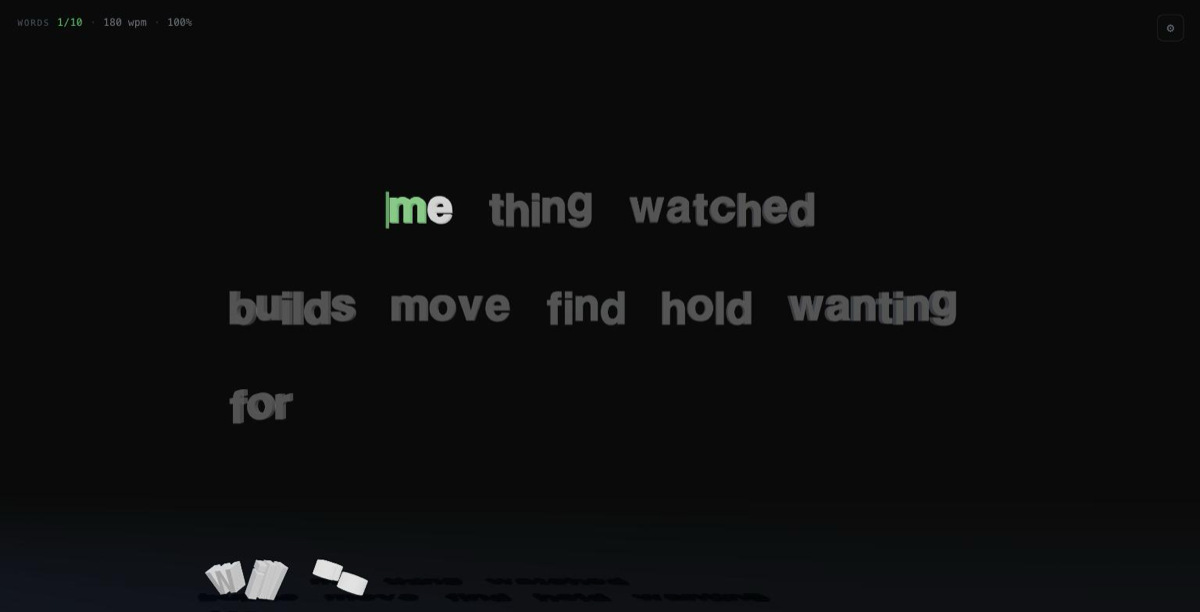
A typing test that happens inside a 3D scene.
What it is
I use monkeytype every day, so Typefall is the same thing — a real typing test — rendered in three.js instead of on a flat page. The default view is star wars. The reading surface tilts back like a Star Wars opening title and the lines climb the plane continuously toward a horizon, shrinking and fading with distance. You type each line as it travels up. The active word is the one you're on; a thin caret with a slow molten-gold sheen rides it up-plane every frame, lerping and blinking like monkeytype's. The catch is the miss line, about 60% up: if a word reaches it still untyped, it's marked missed — it reddens, dissolves into ash where it sits, and the passage moves on. So it's a race against your own pace, not the clock. There's a speed setting for it — 1x, 1.4x, 1.9x, 2.5x, or auto, which rubber-bands the climb rate to your rolling WPM so the miss line always sits just behind you, chasing your true speed. A sparse, slow starfield sits behind it, and that's the whole backdrop — no lens flares, nothing loud.
Underneath the crawl is a measured-flow layout engine, and it also drives a paragraph view you can switch to — monkeytype's calm readable wall of rows. The reading surface there is flat, crisp SDF text — a real monospace typeface (Space Mono) rendered with troika-three-text — so it reads like a proper typing tool rather than a row of chunky objects. Each word is measured by the font's real glyph advances and placed one normal space after the last, wrapping into a centered, constrained column exactly like prose; monospace means every row lines up. Three lines stay visible; finish the active line and the block scrolls up one row — the finished line fading out above, a fresh one fading in below. The column is derived from the camera frustum, so it keeps its size and stays centered at 1024, 1440 and 1920 and recomputes on resize without losing your place. There's also a stream view, where the words fly in from the background as chunky extruded 3D letters: the current word big and close, the next few receding into the dark. Click away in any view and the passage dims with a small "click to focus" line, like the real thing.
The typing is the same everywhere, and this round changed how it feels. Every correct keystroke now sends that letter out of the scene: a chunky extruded 3D copy peels off and fires the completion effect you picked — it drops and piles on the floor, bursts into particles, dissolves into ash, spirals off, rockets up, or shatters into shards — while the flat surface glyph fades out of its slot. The slot stays reserved so the passage never jumps and the caret keeps its place, but the line empties behind you as you type, which is oddly satisfying. Miss a letter and it stays red until you fix it. A word advances on space by default — even a perfect one — with any letters you skipped past marked as errors, exactly like monkeytype; there's an advance setting if you'd rather it jump the instant a word is all correct. Backspace walks back through the current word restoring each letter (they fade back in as untyped gray), and steps into the previous word too when you left it imperfect. Accuracy counts every keystroke — a corrected mistake, and every letter a star-wars word left untyped, still costs you.
The accent moved to a warm gold that matches the rest of my site — the caret, the live WPM, the selected settings, the results, and the new-personal-best moment, where the score gets a single liquid-gold shimmer before it settles. Errors stay red; the scene stays dark. There's a live WPM and accuracy readout — one quiet mono line, brighter while a test runs, with a missed counter in star wars — three modes (timed 15/30/60s, a fixed 10/25/50 words, or endless zen), and a results screen with WPM, raw, accuracy, character counts, time, and missed. Every config keeps its own personal best in localStorage — mode, length and view, plus the speed setting in star wars — so each setup is a separate highscore to chase; beat it and the screen calls out a new personal best, with your last few runs listed underneath. Restart is Tab then Enter, same as the muscle memory I already have.
How it's built
three.js for rendering, troika-three-text for the flat reading surface, cannon-es for physics, plain TypeScript, no framework. The whole thing is built to hold 60fps on a laptop, which drove most of the decisions:
-
The right tool for each surface. The paragraph you read is SDF text (troika-three-text), one glyph node per character: crisp at any size, real font metrics, and cheap — three full lines plus a dozen live clones measure around 2ms a frame. Color changes are just a material uniform, so a keystroke only recolors a glyph and nudges the caret — never a geometry rebuild. The chunky 3D letters — the stream view and every clone that detaches and falls — use extruded
TextGeometry, generated once per character and cached, so those bevelled glyphs are shared by every instance and typing the same letter again costs nothing. -
Effects are pools, not allocations. All the particle effects (explode, disintegrate, launch trails, vortex) draw from a single
THREE.Pointscloud that's stepped on the CPU and drawn in one call. Shatter shards are a small recycled set of boxes integrated by hand. Nothing gets allocated on a keystroke during a fast run. -
Physics only where it earns its keep. cannon-es runs solely for the fall effect and the letters that rain behind the results screen, where real stacking is the whole point. Live bodies are capped and the oldest fade out, so a long test never drifts below frame rate. Shatter fakes its physics because it doesn't need contacts — it just needs to look right for a second.
-
The crawl is just a tilted plane. The lines live on a plane tilted back about the X axis, and I let the perspective camera do the shrinking toward the horizon for free — per frame the only work is translating a handful of line groups up-plane and fading their opacity with distance, transforms and colors, nothing rebuilt. Words are missed the moment their line crosses the miss line; a whole line's leftovers dissolve together, reusing the disintegrate effect at low intensity. The auto speed is a small proportional controller: it aims the climb rate at your rolling-WPM pace, kept a touch behind, and eases toward that aim with a time constant so it never jerks. Five lines, the starfield and ten falling clones together measure under 2ms a frame.
-
A results panel that comes through the canvas, where the browser allows it. Chrome's experimental html-in-canvas API can rasterize a live DOM element with
drawElement; where it exists, the results overlay is painted into aCanvasTextureon a floating 3D panel in the scene, while the real (invisible) DOM overlay keeps the clicks and focus — pixels through the canvas, input through the DOM. It's a progressive enhancement: the detection is guarded and any failure falls back silently to the ordinary DOM overlay, which is what you get in every browser today. A small footer line says which path ran.
Pixel ratio is capped at 2 and the loop pauses when the tab is hidden. There's a
window.typefall handle that can drive a test deterministically — including the
crawl's line progress, miss line, current speed and missed count — which is how I
verify it.
Try it
- Live demo: aitorgallardo.github.io/typefall
- Source: github.com/AitorGallardo/typefall