Cardstock https://gmsudo.com/lab/cardstock/
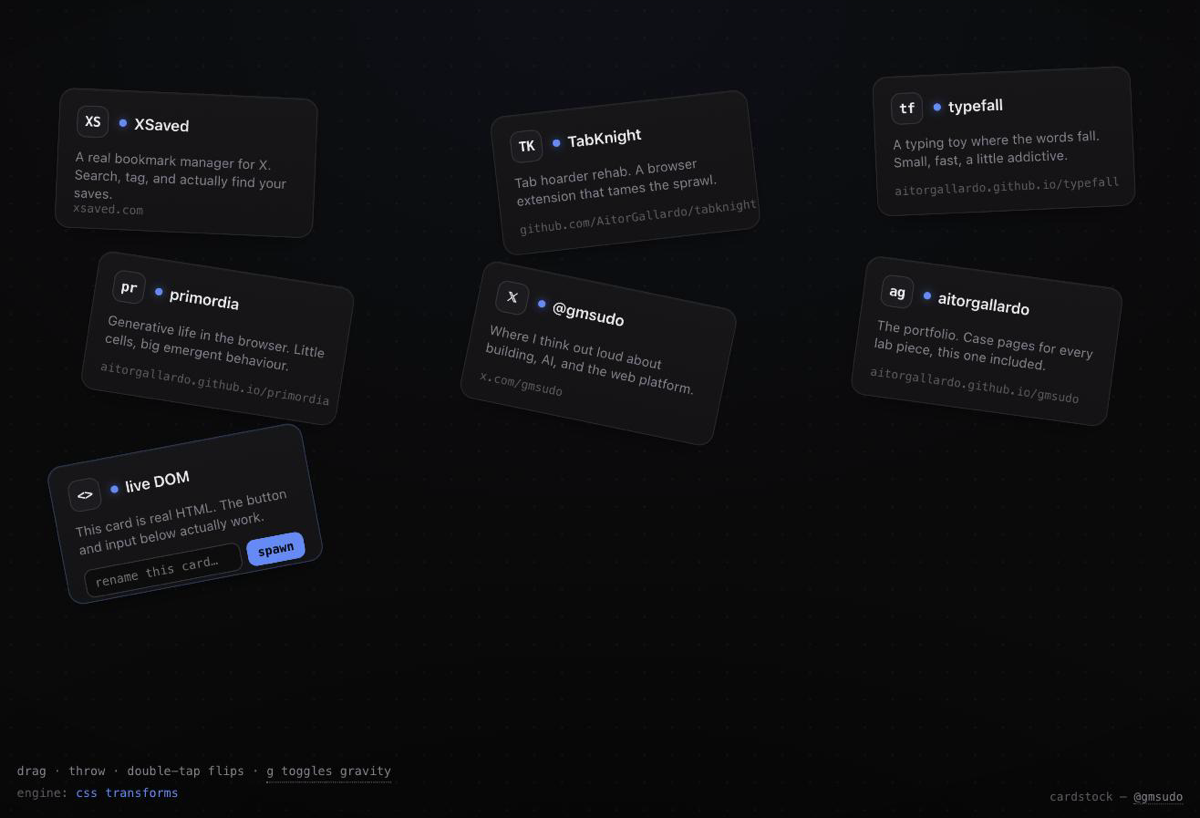
I wanted to answer a small, nagging question: what if a webpage's cards weren't laid out — what if they were objects? Things with weight you could grab, throw, and stack, that bounced off each other and settled. And crucially, what if the HTML inside them stayed completely alive the whole time — links clickable, a text input still typing, a button still doing its thing — while they tumbled?
That's cardstock. Seven real HTML cards in a dark room, run by a 2D physics
engine. Grab one and a spring pulls it to your cursor; let go while you're moving
and it flies off with real inertia and bounces. Double-tap to flip it. Press G
to swap the gentle zero-g drift for gravity and watch the whole stack drop.
What it is
Each card is a normal DOM element — a small bookmark-style card pointing at something I've built. The physics engine (matter-js) owns a rectangle body for each one and does all the real work: collisions, restitution, the spring joint when you grab, the throw velocity when you release. Every frame I read each body's position and angle and write a transform onto the matching DOM node, plus a little velocity-based tilt and a lift-scale so a card you're holding feels like it's off the table.
Because the cards never stop being real DOM, the last one can carry a live text input that renames it as you type and a button that spawns brand-new cards straight into the simulation. New DOM, born at runtime, immediately throwable. That's the whole point — proof this is a live document, not a picture of one.
How it's built
There are two rendering paths, and the HUD in the corner always tells you which one is actually running. I think that honesty is the interesting part, so here's the real story.
The default path — the one that ships today, everywhere, and the one I actually
tuned for feel — is plain CSS. The physics loop writes translate3d(...) rotateZ(...) onto each card every frame. Input, layout, hit-testing: all just
the browser doing what it already does. On a normal browser the HUD reads
engine: css transforms, and that's not a fallback I'm apologizing for — it's a
60fps interactive toy on desktop and touch with nothing exotic required.
The enhancement is Chrome's new HTML-in-canvas API. For about twenty years you
could not draw live DOM into a <canvas>; this API finally lets you. You mark a
canvas with the layoutsubtree attribute so its child elements get laid out and
hit-tested, then call ctx.drawElement() to rasterize an element and its subtree
into the canvas. When cardstock detects it, I re-parent the live cards into that
canvas and paint them there each frame — but because those cards are still
laid-out, hit-tested canvas children, the exact same pointer code keeps working.
Pixels flow through the canvas; input still flows through the DOM.
I want to be precise about what that new API does and doesn't buy you right now,
because it's easy to oversell. It genuinely does the thing that was impossible
before: real, live, styled DOM rasterized into a canvas, so you can composite it
with WebGL, shaders, or 2D drawing. What it does not do today is deliver clicks
and taps to those rasterized pixels — the spec sends interactivity back through
hit-testing on the canvas' laid-out children, and you're expected to map
coordinates yourself. It's Chrome-only (Chrome 138 developer trial behind
chrome://flags/#canvas-draw-element, origin trial from Chrome 148; no Firefox
or Safari commitment), and even the method name is still settling — some builds
expose drawElement, others drawElementImage. So I feature-detect defensively,
wrap every canvas call, keep an always-interactive DOM layer as the source of
truth, and fall straight back to CSS transforms the instant anything looks off.
Nothing you touch ever depends on a flag being enabled. That's the design rule:
feel great everywhere first, show off the new platform capability second.
Try it
Open it, grab a card, throw it into the others. Type in the live card, spawn a
few, hit G and drop the stack. It works on a phone too.
The idea eventually graduated into this very portfolio. Type play in the
site's terminal and watch the home page come apart — every row detaches, tips,
and falls into a pile you can throw around, then esc puts it all back. Same
physics, same live DOM, just wearing the site's own clothes.
- Live demo: gmsudo.com/lab/cardstock
- Source: github.com/AitorGallardo/cardstock